Accessibility Audits

Your starting point for a more inclusive website. Our WCAG 2.1 and 2.2 Level AA audits go beyond automated scans. We test by hand with real screen readers and other tools to find the barriers that affect real users. You'll know exactly where problems are, how serious they are, and how to fix them.

How does it work

A thorough approach to find, rank, and fix access barriers on your site.

Auditing

Every audit targets WCAG 2.1 and 2.2 Level AA. This is the standard required by the ADA, Section 508, and the European Accessibility Act. We start with automated scans using tools like Axe and WAVE to set a baseline. Then we go deeper with manual testing using NVDA, JAWS, VoiceOver, and TalkBack across web, iOS, and Android.

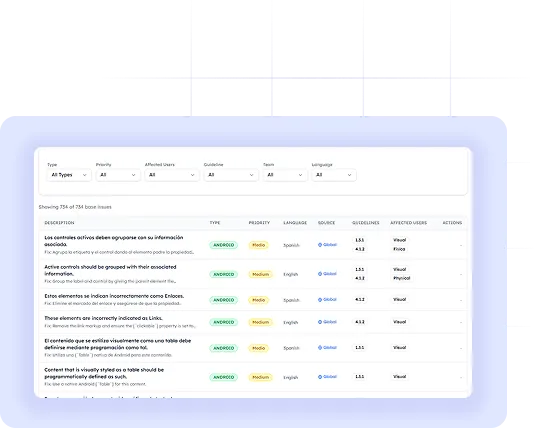
Each session covers keyboard-only browsing, screen reader checks, zoom testing, and color contrast review. You get a clear report with a health score, every issue sorted by WCAG rule and severity, steps to reproduce each problem, and code-level fix tips. Everything your team needs to act right away.

Remediation

We rank every finding by severity: critical, serious, moderate, or minor. So your team knows where to start. Critical issues that fully block access are flagged for immediate action. Serious and moderate issues are mapped into a phased plan based on user impact and level of effort.

We don't just hand over a report and walk away. Our team works side by side with your developers: reviewing pull requests, answering questions, and checking fixes before they go live. Once critical issues are resolved, we run a follow-up review to confirm compliance and update your health score. The goal is lasting results, not a one-time checkbox.

Maintenance

Access is not a one-time project. Every new feature, content change, or redesign can create new barriers. Our maintenance program keeps your site compliant after the initial fixes are in place.

We run scheduled check-ups: monthly or quarterly based on your release cycle. These are focused on new templates, updated parts, and fresh content. Each round produces a focused report with a refreshed health score so you always know where you stand. We also provide a yearly full-site re-audit to catch any drift and keep your access statement current.

Professional accessibility audit report

It Starts with Design

The best time to catch access issues is before any code is written. Fixing a contrast ratio in Figma takes seconds. Fixing it after launch (across a live component on 40 pages) takes hours.

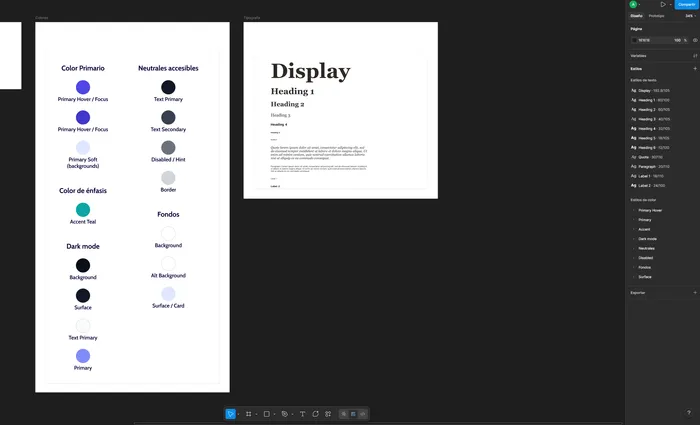
We review your wireframes and prototypes against WCAG 2.1/2.2 rules right inside Figma, Adobe XD, InVision, or Sketch. We check color contrast for text and buttons, make sure focus order follows a logical flow, confirm touch targets are large enough, and review type, spacing, and layout for cognitive access.

You get marked-up design files with every issue explained and linked to the matching WCAG rule. Your designers can build accessible patterns from day one.

Start with a design audit
Step 1: Send us your files

Share a view-only link or export from any design tool: Figma, Adobe XD, InVision, or Sketch. Polished mockups, rough wireframes, and clickable prototypes all work. The earlier you share, the bigger the impact.

Step 2: We analyze and evaluate

We review your designs against WCAG 2.1/2.2 AA rules. We check color contrast, focus order, touch target sizes, text clarity, form labels, and interaction patterns. Every issue is marked right on your design files with the WCAG rule and a clear note on what to change and why.

Step 3: Apply the knowledge

You get marked-up files along with a written summary. Your designers can apply the changes before handing off to developers. This avoids the most costly type of access fix. We're here to answer follow-up questions as your team works through the feedback.

Professional accessibility audit report

Why it matters?

Fixing access issues at the design stage saves time and money while cutting legal risk. It means new features, builds, or rebrands are inclusive from the start, not as an afterthought.

Start your design audit

Frequently Asked Questions